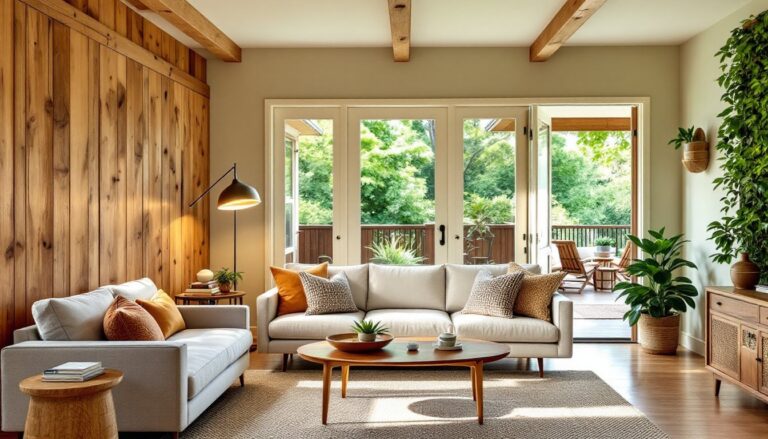
Deciding to renovate a room or redesign your entire home is exciting, but visualizing the final result before you spend money and time can be tricky. 3D rendering has shifted from an expensive designer-only tool to something homeowners and DIYers can use themselves. Whether you’re planning a kitchen remodel, reimagining a bedroom, or overhauling your living space, 3D interior render software lets you test colors, layouts, and materials in photorealistic detail before swinging a hammer or calling a contractor. This guide walks you through what 3D rendering is, why it matters for your projects, and how to get started, no architectural degree required.
Table of Contents
ToggleKey Takeaways
- 3D render interior design software has become accessible to homeowners and DIYers, allowing you to visualize colors, layouts, and materials in photorealistic detail before making expensive changes.
- Catch design mistakes early and save thousands on revisions by testing room layouts, material proportions, and lighting in a 3D render before ordering materials or hiring contractors.
- Free and freemium tools like Planner 5D, Homestyler, and SketchUp Free provide enough functionality for most homeowners to create effective 3D renders without steep learning curves or subscription costs.
- Accurate measurements and a methodical approach—starting with one room, building a precise floor plan, and iterating one element at a time—are essential to getting realistic results from 3D rendering.
- 3D interior render projects work across kitchens, bathrooms, bedrooms, and open-concept spaces, helping you visualize everything from cabinetry placement to paint colors and lighting design.
- Lighting adjustment is often the most overlooked but transformative step in 3D rendering, as it determines how colors and proportions appear in your actual room’s natural light conditions.
What Is 3D Rendering in Interior Design?
3D rendering is a digital process that creates a photorealistic or stylized visualization of a space based on 2D plans, measurements, and design elements. Think of it as a detailed, three-dimensional blueprint you can walk through, rotate, and inspect from any angle, before a single nail goes into the wall.
A 3D interior render starts with room dimensions and architectural features (walls, windows, doors, built-ins). From there, designers layer in materials like flooring, wall finishes, and cabinetry: add furniture and fixtures: set lighting: and apply textures and colors. The software then “renders” the final image, essentially computing how light bounces off every surface to produce a realistic preview.
The result is far more intuitive than floor plans or mood boards. You can see proportions, sightlines, and how a deep navy accent wall actually looks in your natural light, not just in a paint sample under fluorescent bulbs.
Why 3D Renders Matter for Your Projects
Key Benefits for Homeowners and DIY Enthusiasts
Catch design mistakes early. Before ordering $2,000 in cabinetry or scheduling a contractor, you can test whether a layout really works. Does the island block the walkway? Are the pendant lights at eye level? A render shows you instantly.
Visualize materials at true scale. Paint chips and fabric swatches lie. A 2-inch tile sample doesn’t show how that pattern reads across 150 square feet of floor. 3D renders show realistic proportions and how colors interact.
Save money on revisions. Changing a cabinet color on-screen costs nothing. Changing it after installation costs time and cash. Rendering upfront dramatically reduces costly do-overs.
Communicate clearly with contractors and family. A render is universal: anyone can understand it, even if they can’t read blueprints. No more explaining your vision: show it.
Get approval and confidence. Showing stakeholders (spouse, landlord, lender) a detailed render builds confidence in the plan and secures buy-in before you begin.
In short, 3D renders answer the question every homeowner asks: What will this really look like? They let you experiment without risk, compress decision-making timelines, and move forward with certainty.
Tools and Software for Creating 3D Interior Renders
There’s a tool for every skill level. Professional designers use high-end software like SketchUp Pro, AutoCAD, or V-Ray, but those come with steep learning curves and subscription costs ($300–$500+/year). Fortunately, many alternatives are more approachable.
Entry-level and freemium options:
- SketchUp Free – Browser-based, intuitive interface, free with limited features. Great for basic room layouts.
- Blender – Open-source, powerful but steep learning curve. Free, and widely used by professionals.
- Roomstyler or Planner 5D – Drag-and-drop simplicity: design rooms on your phone or desktop. Free versions available.
Mid-range, user-friendly tools:
- Homestyler – Intuitive drag-and-drop, large furniture library, fast rendering.
- Sweet Home 3D – Open-source, affordable, good for quick floorplan-to-render workflows.
Professional-grade (if you’re serious):
- SketchUp Pro – Industry standard for quick renders and construction docs: integrates with rendering engines like Enscape or V-Ray.
- Lumion – Fast, beautiful renders: great for interiors: steeper price but faster output than competitors.
For most homeowners, a freemium tool like Planner 5D or Homestyler is genuinely sufficient, they handle color, material, lighting, and furniture placement without the learning overhead of professional software. Pair them with a free online rendering engine if you want ultra-photorealistic output.
Platforms like Houzz for Pros and Homeowners also let you build inspiration boards and visualize designs before committing to software.
How to Plan Your 3D Render Project
Start small and methodical. Don’t jump into rendering without a solid foundation.
Step 1: Measure your space accurately. Use a tape measure, not your phone’s app (yet). Record wall lengths, ceiling height, window and door placement, and any existing built-ins. Nominal dimensions matter: if your wall has baseboard or crown molding, note the height from finish floor to where the wall truly ends.
Step 2: Decide scope. Are you redesigning one room, a few spaces, or the whole home? Stick to one room for your first render, less complexity, faster learning curve, quicker payoff.
Step 3: Gather reference materials. Collect images of colors, styles, and materials you like. Digital swatches or paint-chip photos work. Modern interior design styles can guide your aesthetic direction if you’re unsure.
Step 4: Choose your materials. Before rendering, decide on flooring, wall color, cabinetry finish, countertops, and hardware. Specificity helps: not just “white cabinets,” but “semi-gloss white shaker style” or “matte white flat panel.” This prevents surprises later.
Step 5: Create a basic floorplan. Use graph paper or your software’s drawing tools to sketch the room to scale. Note dimensions on every wall. This is where errors creep in, be meticulous.
Step 6: Import or build in your software. Feed your dimensions and floorplan into your chosen tool. Most software has templates or import options. Take time getting the shell right: everything else builds on this foundation.
Real-World Applications: From Kitchen Remodels to Full Home Redesigns
Kitchen remodels: This is where 3D rendering shines. You can preview cabinetry layout, appliance placement, countertop material, backsplash tile pattern, and lighting before ordering anything. A small kitchen might look cramped with a certain island size, the render reveals this in seconds. Many office interior design principles (think workflow and spatial efficiency) apply equally to kitchens.
Bedroom and bathroom redesigns: Test paint colors on all four walls, see how different bed sizes and furniture arrangement feel in the space, preview tile or stone selections for bathrooms. Lighting placement is critical in bathrooms: a 3D render shows if vanity lights are proportionate and functional.
Open-concept living areas: If you’re removing a wall or combining spaces, rendering helps you visualize the new flow, furniture placement, and whether storage solutions work. Sightlines matter, can you see the kitchen from the sofa? Does the TV placement work from all seating angles?
Renovation planning for staging or resale: Prospective buyers struggle to envision potential. A render of updated finishes, modern paint colors, and staged furniture can increase perceived value and shorten time-on-market, especially for interior design apps that let realtors showcase transformations.
Full home redesign and style cohesion: Are you shifting from one design style to another? Rendering room-by-room with consistent materials, color palettes, and finishes ensures the home feels unified. This is particularly useful if you’re exploring Scandinavian interior design or other cohesive aesthetic approaches across multiple rooms.
Getting Started With Your First 3D Render
Pick a single room you want to redesign, your bedroom, a bathroom, or a small office nook. Follow this workflow.
1. Measure and document. Spend 30 minutes with a tape measure. Walls, ceiling height, window dimensions, electrical outlet placement, closet openings. Take photos. Be precise: 1/8-inch errors compound across a room.
2. Choose your software. Download Planner 5D or Homestyler (both free) and spend an hour exploring. No commitment yet, just get familiar with the interface.
3. Build your room shell. Input walls, doors, and windows. Match your exact measurements. This sounds tedious but it’s non-negotiable: garbage in, garbage out.
4. Add existing fixtures. If your kitchen has custom cabinetry or your bathroom has built-in shelving, place it in the render. Understand what stays and what you’re replacing.
5. Layer in your design. Start with major elements: flooring color and material, wall paint, cabinetry or furniture. Then add fixtures, lighting, and accessories. Work top-down: big decisions first, details last.
6. Adjust lighting. Most software lets you control ambient light, window light, and accent lighting. Adjust these to mimic your room’s actual natural light at different times of day. This is where renders often fail if overlooked, lighting transforms everything.
7. Render and review. Export your final render. Look at it in full-screen, printed on paper, and shown to others. Ask: Does the layout work? Do colors feel right? Are proportions realistic? Would you be happy living with this for 5+ years?
8. Iterate and refine. Change one thing at a time, swap a cabinet color, adjust the island size, swap a tile pattern. Compare before-and-after renders side by side. This iterative process is where 3D rendering proves its value.
Your first render might take a few hours. By your third or fourth project, you’ll move much faster. Resources like Homedit’s design inspiration library and Dwell’s modern home ideas can inspire refinements along the way.
Many homeowners also explore interior design styles guides to clarify their aesthetic before rendering. Knowing whether you’re drawn to minimalist, farmhouse, industrial, or eclectic aesthetics accelerates decision-making in the software.
The Bottom Line
3D rendering isn’t magic, and it won’t design your space for you. But it removes guesswork and replaces it with visual certainty. A well-executed 3D render costs you nothing but time and thought upfront, yet it can save thousands in materials, labor, and regret.
Start with one room, choose a simple, free tool, measure carefully, and be honest when evaluating results. The goal isn’t a magazine-perfect render, it’s a clear, realistic preview of what you’re building. Once you’ve nailed one room, scaling up to multiple spaces or planning that full-home redesign becomes far less daunting. Your 3D render becomes the blueprint your contractor follows and the vision your entire household rallies behind.